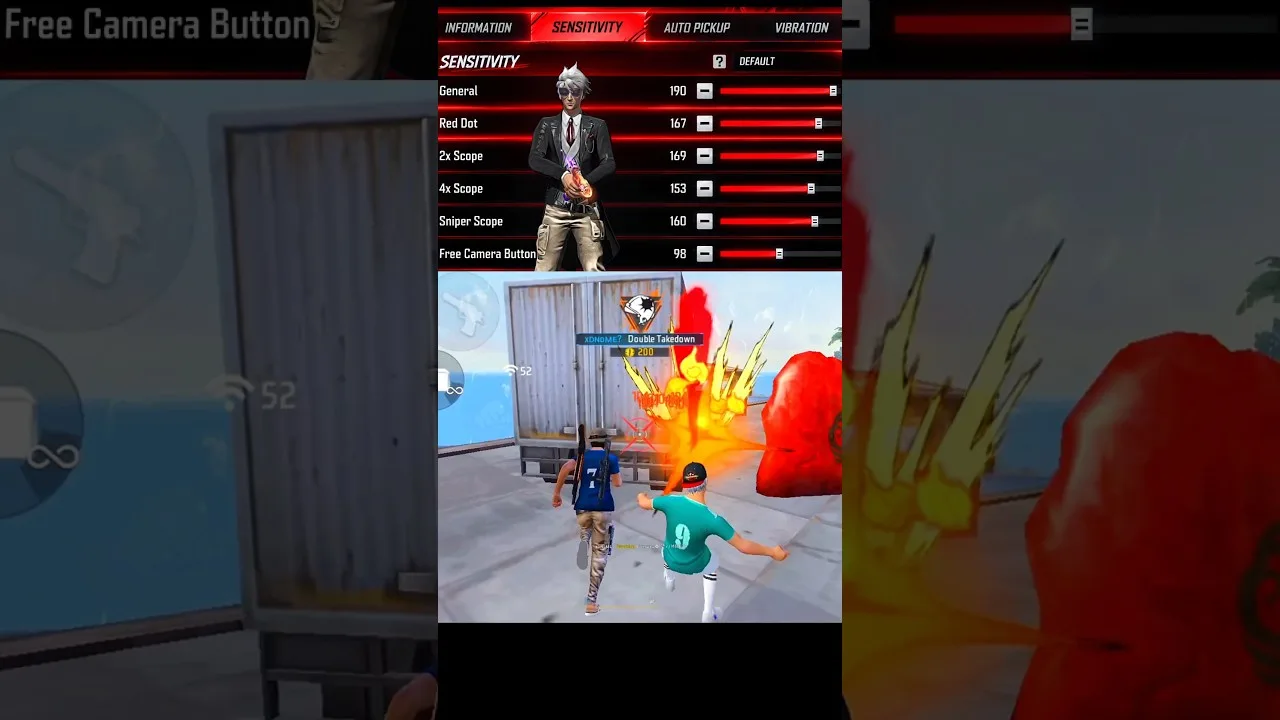
Sensitivity settings decide how far your in game view moves for each swipe of your thumb. In Config FF, the sensitivity section groups those values together so you can review general movement, red dot aiming, each scope level, and free look as one connected system rather than scattered numbers.
Players often copy a full set of values without knowing what each number controls, then struggle to fix the one part that feels wrong. Learning what every slider does turns that guesswork into small, deliberate adjustments you can repeat on any phone.
You can explore the grouped values yourself through the Config FF sensitivity tool on this site, where the sections are laid out in the same order you will meet them in the game. Reading the layout first makes the explanations below easier to apply.
General Sensitivity
General sensitivity controls overall camera movement when you are not aiming down a sight. It shapes how quickly you can turn, check corners, and react to sounds behind you. Most players treat it as the base value, because every other sensitivity feels relative to this one.
If general sensitivity is too low, turning feels heavy and you lose close fights you should win. If it is too high, your view shakes and small corrections become hard. Change it in small steps and test each change with a few full turns and quick direction swaps.
Red Dot and Close Range Values
The red dot value controls aiming movement while using a red dot sight, which covers a large share of close and mid range fights. It needs enough speed to track a moving target, but enough control to stop on the target instead of sliding past it repeatedly.
When testing red dot settings, track a moving practice target at typical fight distances. Smooth tracking with small corrections is the goal. If you constantly overshoot, lower the value slightly. If you fall behind the target, raise it slightly and test again.
Scope Sensitivities From 2x to 8x
Each scope level has its own sensitivity because magnification changes how movement feels. A swipe that feels calm at 2x can feel wild at 8x, since the view is zoomed in much further. Higher scopes usually need gentler values so long range aim stays stable.
Adjust scope values in order, starting from the scope you use most. Many players rely mainly on 2x and 4x, so those deserve the most testing time. The Config FF DPI settings guide is a useful companion here, because DPI and scope sensitivity interact closely on smaller screens.
Free Look Sensitivity
Free look lets you look around without changing your running direction, which is valuable when crossing open ground or checking flanks while moving. Its sensitivity is separate because scanning needs wide, fast sweeps rather than precise stopping power.
Most players keep free look a little faster than general sensitivity, so a short drag covers a wide angle. Test it by running in a straight line and scanning both sides. If scanning feels sluggish, raise it a little. If the view spins too easily, lower it.
How to Adjust in a Sensible Order
Work from general to specific: set general sensitivity first, then red dot, then your favourite scopes, then free look. Changing one value at a time keeps cause and effect clear, and writing down each change lets you return to a previous step if a session feels worse.
For a wider routine that combines sensitivity work with the rest of the app, the best ways to use Config FF on Android explains how to spread adjustments across sessions instead of changing everything in one sitting and losing track of what helped.
A helpful way to think about the whole group is as layers of the same skill. General sensitivity is your turning speed, red dot is your working aim for most fights, scopes are your precision tools for distance, and free look is your awareness layer. When a fight feels wrong, ask which layer failed. That question usually points straight at the one slider worth touching, instead of sending you into a full rebuild.
Signs a Value Needs Changing
Each sensitivity value announces its problems in a recognisable way. Overshooting targets sideways suggests the working value for that aim mode is too high. Falling behind a moving target suggests it is too low. A shaky view during tiny corrections suggests the value is beyond what your thumb can control smoothly on your screen size.
Keep a short testing note for each change: the value, the date of the session in your own private notes, and one sentence about what improved or worsened. After a few changes, that note becomes a map of your preferences. It also stops the familiar loop of returning to a value you already proved wrong, simply because you forgot you had tried it.
It also helps to revisit these explanations after a few weeks of play, not only at the start. Concepts that felt abstract on day one become obvious once your hands have felt overshooting, lagging tracking, and shaky scope corrections in real fights. Reading the same guide with experience behind you often unlocks the one adjustment you were not ready to understand earlier, which is a sign the learning is working exactly as it should.
Final Thoughts
Every sensitivity value in Config FF has a clear job: general movement, red dot tracking, scoped precision, and free look scanning. Learn those jobs, adjust one value at a time, and test honestly in practice. That steady method builds a setup that fits your hands instead of someone else.